Home / One Platform / X4 BPMS
Automated processes. Smart integration. Bigger impact.
The X4 BPMS low-code platform lets you seamlessly automate your business processes and integrated IT systems. You can speed up your digitalization journey, optimize your workflows, and give your efficiency a permanent boost.
Simple automation of your business processes
Powerful connection of your IT systems and data
Rapid rollout thanks to Low Code approach
Flexible & scalable operations
Driving force for successful digitalization in over 300+ companies


X4 BPMS guides you through all project phases
Model and run processes instantly
Create and design business processes intuitively, with drag-and-drop in a graphical editor. The process models are immediately executable and lay the groundwork for subsequent automation.
Develop faster with kit and live debugging
Reusable modules and prefabricated components let you build applications efficiently. Test and optimize all features directly in the development environment.
Connect all systems and data cleverly
X4 BPMS integrates all relevant systems and data sources on a single platform. Design and integrate processes across system boundaries without requiring complex interface projects.
Deploy quickly, publish reliably
Ready-to-use guides for deployment pipelines let you publish your applications with just a few clicks, letting you roll out new features to the production environment quickly and reliably.
Monitor, analyze, and optimize processes
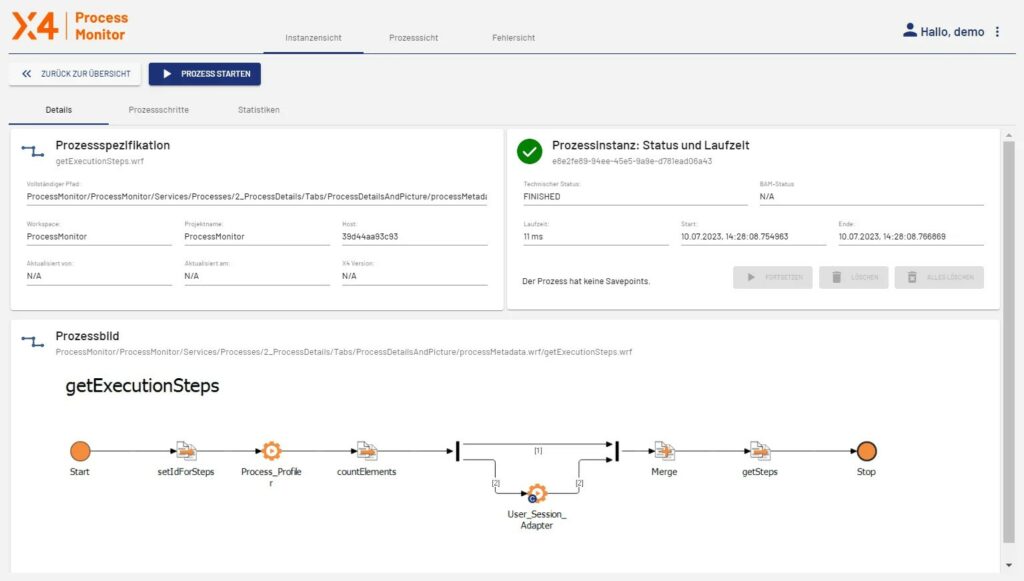
Monitor the status of your processes, interfaces, and applications in real time. Analysis and monitoring functions will support you with identifying and capturing optimization potential quickly.
Results are measured in data
Faster Implementation
compared to conventional development
Adapters
for integrating any system – ERP, CRM, IoT legacy systems, and more
Transparency
in real time for all processes – thanks to extensive monitoring and reporting
Process Modules
field-tested and reusable for fast project results
X4 Features
Simple process automation
Graphical modeling of business processes makes complex workflows transparent and easy to modify. You can keep track of the big picture at all times, speed up workflows, and respond flexibly to new requirements.
Integrate all data
Connect your applications, data sources, and systems through a central platform – quickly, flexibly, and reliably. 200+ adapters ensure that you can integrate even complex IT landscapes seamlessly and sustainably.
UIs without programming
Use your processes directly to create user-friendly web applications – responsively and interactively. Use forms, input screens, and dashboards to integrate users in your processes with low code.
AI-supported development
Integrated AI features make it easier for you to implement processes with X4 BPMS. They help you to analyze processes, automate decisions, and classify inputs.
Real-time monitoring
Keep track of active processes, systems, and interfaces at all times. Intuitive dashboards, notifications, and analytics help you to identify potential bottlenecks early on and continuously optimize your processes.
Flexibly extensible
A Software Development Kit (SDK) lets you enhance and customize the platform with your own components and adapters. The SDK provides maximum flexibility for developers for seamless integration.
Powerfull integration
With more than 200 apps
The AI assistant in X4 BPMS gives you intelligent development support. It takes care of routine development tasks and generates data maps and draft forms in seconds.
FAQs
What is X4 BPMS?
X4 BPMS is a low-code platform for the rapid modeling, automation, and integration of business processes and IT systems – without complex programming.
Who is X4 BPMS made for?
X4 BPMS is made for companies of all sizes that want to digitalize their processes efficiently, create enterprise applications quickly, and integrate IT systems flexibly.
Can I request a free trial license?
Yes, you can use the full functional scope of X4 BPMS free of charge for 30 days.
How fast can I implement initial applications with X4 BMPS?
Thanks to the low-code approach, a wide range of adapters to IT systems, and prefabricated modules, you can develop your first functional applications after just a few days.
What processes can be monitored with X4 BPMS?
All the processes that have been modeled or integrated with X4 BPMS – including technical processes, interfaces, and user interactions.
Do the monitoring tools have to be licensed separately?
No. Monitoring with the Process Monitor in X4 Control Center is an integral component of X4 BPMS.
Can I also analyze individual process steps?
Yes, the graphical flow shows you exactly where an error or delays occurred.
Can I restart processes manually?
Yes, interrupted processes can be specifically restarted or continued.
Do I need to program processes?
No. Processes are modeled graphically – in executable form and without programming code. Technical logic is mapped using adapters and modules.
What is the difference between BPM and ESB in X4 BPMS?
BPM organizes and controls business processes, while ESB takes care of the technical integration of all systems and data sources. X4 BPMS combines both solutions.
How quickly can a process be implemented.
Often in just a few days, depending on the complexity – through reuse of existing modules and prefabricated adapters.
How does X4 BPMS scale up in the face of growing complexity?
X4 BPMS grows together with your requirements – from simple workflows to enterprise-wide process landscapes. Thanks to its modular architecture, reusability, and centralized monitoring, you remain in control even when faced with growing complexity.
How quickly can the first UIs be created?
X4 web apps often let you create executable prototypes in just a few hours – without coding and directly connected to your processes.
Which components are available?
Yes, responsive user interfaces can be implemented, which work on tablet PCs, smartphones, and desktops.
Can I customize user interfaces to roles?
Yes, access permissions, object visibility, and workflows can be controlled role-specifically – for secure, personalized work.
How are data sources connected?
In X4 web apps, your user interfaces are seamlessly integrated with the powerful Enterprise Service Bus (ESB). More than 200 prefabricated adapters enable effortless integration with a wide variety of data sources –for maximum flexibility and efficiency in your applications.